



Audio Headphone Adapter Wireless Receiver For Ps5 Ps4 Pc Headset Bluetooth 5.0
Original price was: €33,95.€24,95Current price is: €24,95.
- Hurry up! Only 2 discounted items left in stock!
✅ Free shipping
✅ Returns accepted
✅ Processing Time: 1-3 business days
Feature:
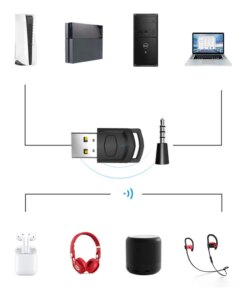
Strong compatibility, suitable for multiple devices, stable and fast
Plug and play, automatically connect back
Professional team design, stylish appearance, compact and portable
Low latency, low power consumption, easy to get rid of the troubles of wired.
Specification:
Material: ABS
Bluetooth-compatible version: 5.0
Effective distance: 8-10 meters
Application: for PC/PS4/PS5
Size: 35*17*7mm
Packing List:
1x Bluetooth Headset Adapter USB Receiver


| Weight | 10 kg |
|---|---|
| Dimensions | 10 cm |
| Brand Name | kebidu |
| Origin | Mainland China |
| Compatible Brand/Model | Sony |
| Compatible Sony Model | PS5 |
| Model Number | Wireless Receiver |
| Fearture 1 | Adapter Receiver for PS5 PS4 |
| Fearture 2 | Wireless Headphone Adapter Receiver |
| Fearture 3 | PC Headset Bluetooth Audio Transmitter |
| Fearture 4 | PS5 Bluetooth Adapter |
| Fearture 5 | ps5 bluetooth receiver |
| Fearture 6 | PS5 dongle |
| Choice | yes |
| semi_Choice | yes |
14 reviews for Audio Headphone Adapter Wireless Receiver For Ps5 Ps4 Pc Headset Bluetooth 5.0
Only logged in customers who have purchased this product may leave a review.
Shipping details:
 Original price was: €33,95.€24,95Current price is: €24,95.
C***a –
Well packed, seems good quality, the shipping was very fast, and the price is affordable considering the solution these items will be in my daily journey. I recommend 100% the seller.
G***o –
подключил к ps4 pro, наушники и микрофон работают. в настройках пс после подключения нужно сменить вывод аудио через гарнитуру с ,,только чат ,, на ,,все звуки,,
Customer –
Great item, very happy, recommend it
N***v –
This works perfectly with PS5 Pro. Sharing instructions how to use: 1. Put the dongle in a usb port on the back of the console and the 3.5mm thingy in your joystick. 2. Press the button on the dongle and hold until the blue light on it starts blinking. 3. Turn bluetooth on or take out from the box your earbuds/headphones. 4. Wait a few seconds and it should ask you on the console whether to pair. This should be in the description, but I guess we don’t live in a perfect world.
Customer –
Works well
A***s –
Easy to connect ps5 and Marshall headphones, no delays in sound. Fast delivery
h***h –
Perfect, fast shipping good quality
a***r –
fonctionne parfaitement rien a redire et très facile d’utilisation
Customer –
Funciona muy bien
m***r –
funciona maravilloso
A***d –
الجهاز ممتاز و يعمل بشكل جيد
W***J –
Produit bien reçu, fonctionne très bien avec ma PS5. Le son est bon, la connexion est stable. J’utilise mes écouteurs, et il faut parfois les réappareiller, car je les utilise aussi sur mon iphone.
H***a –
Es muy buen producto, de inmediato lo probé y funcionó a la perfección
E***a –
Tal cual como se muestra en la foto, fácil de instalar y el envío llegó días antes de lo estimado.
Customer –
i got it but now I can’t find it. could I get a replacement, it’s missing and I don’t have money for another
Customer –
잘됨
Customer –
Simple perfect tool.
C***e –
He conseguido conectar mis AirPods Pro a la PS5 siguiendo las instrucciones. Recomiendo desvincularlos primero del iPhone y, después, colocarlos junto al adaptador USB con el estuche abierto. Mantén presionado el botón de los AirPods mientras los acercas al adaptador para que se vinculen sin problemas.
J***o –
Por fin, mis Airpods 2 se han conectado automáticamente a la PlayStation 5. Al principio me ha costado conectarlos, porque tienes que hacerlo paso por paso para que se conecte automáticamente. Así que recomiendo ver algún que otro vídeo por Internet que te indica cómo un transmisor de Bluetooth se puede conectar a tus auriculares inalámbricos.
Customer –
منتج كويس جدا
b***c –
Usei no ps4 e está funcionando muito bem. O ps4 reconhece como um fone de ouvido.
L***C –
muchas gracias al vendedor, producto de buena calidad, envío super rápido y en buenas condiciones, paquetería exelente, vendedor muy recomendable y honesto, saludos
Customer –
Very satisfied, recommended seller.
A***a –
Usado en ps4 para conectar auriculares JVC . Todo 10 Lo recomiendo